
Showing posts with label Webex. Show all posts

Tuesday, September 7, 2021

INTERESTING FEATURES OF WEBEX LANGUAGE INTERPRETATION

WebEx by Cisco is a company that offers business collaboration solutions. It increases productivity and business agility with its products. That counts on networking, software, the internet of things, mobility, security, collaboration, and data center. The most interesting service it offers is Language Interpretation and also sign language Interpretation like Zoom. Its connecting business on a large scale. Though these service providers are producing market competition WebEx is also in the game. 

Features of WebEx Language Interpretation: 

Language Interpretation and sign language Interpretation is an important feature in business and meetings. It also works well for schools, government, and colleges. WebEx provides some interesting features in its language Interpretation that make it unique from its competitors. 

Customization: 

WebEx offers to its user the languages combination needed to interpret the languages. It has devised solution-based problems for the users. 

Set on mute: 

One of the interesting features of WebEx is that the host can set every participant on mute. It offers the least inconvenience for whole interpreting and translations. A peculiar number of participants can contribute when needed otherwise they can listen to the conversation happening. 

Security Feature: 

WebEx offers high-quality security, especially for business meetings. Encryption and user authentic optimization are available for video conferencing. Data security is much important for video conferencing tools. As a large number of participants are contributing and everyone is conveying tactics and strategies of their business. Data is shared with a wider audience hence the content is official. Chances are more to get attacked by the hackers in this case. So, WebEx is safe and well-encrypted. 
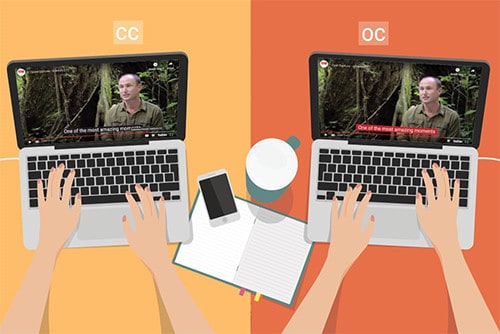
Captions in video conferencing for Conversation

Noise Removal: 

It works significantly for noise removal. Background noises can disrupt the whole idea of a meeting leading to ineffective communication. But with WebEx noise is removed leading to the effective conversation and language Interpretation. 

A live attendant: 

WebEx contains a live attendant to welcome and greet when logging in to the software. This is a heart-warming feature. It authorizes the participant and verifies it.  

Automated Captions: 

The host has the authority to on and off the interpretation and captions. It also allows you to verify your interpreter which is another interesting feature of WebEx Language Interpretation. When the interpretation and caption are not needed it is convenient to switch it off. 

See the Language Interpreter: 

WebEx is customized in such a way that many of the features are up to the choice of the users. The window for the interpreter can entirely be minimized and maximized and set the original audio in the background. It also offers a timer on the screen to get check the time allotted to every participant.  

Invite Participants: 

Invitation to listen to the interpreter is another amazing feature of WebEx. A user can invite another one to listen to the desired interpretation without breaking the flow of the actual conversation happening. It maintains the rhythm thus it does not offer any disturbance to other participants. 

Sign Language and Layout: 

These options make it more accessible as the sign language features increase its reach to the broader audience with the comfortable layout which is customizable. Layout adjustments are different with every individual so it’s exciting to set the frame according to your need. 

Conclusion: 

WebEx has numerous competitors in the markets. Language Interpretation has gained immense popularity and a lot of work and improvements are done in this feature. But the security of WebEx is exceptional during meetings and conferences. As the Zoom Application got immense attacks from hackers during the pandemic but WebEx has strong security encryption that makes it the safest among all. Its customization features attract the user to keep everything from layout to naming the folder up to their demand. It has a higher reach due to its sign language interpretation feature. For more unique content check out Languagers. 

Tuesday, May 25, 2021

ONLINE INSTRUCTORS' GUIDE: VIDEO CONFERENCES IN EDUCATION

 Are you a teacher who is planning to create videos for her students to improve their academic performance? In today’s fast-paced globalized environment, this is now a fundamental prerequisite to creating online content. In this environment, students want their teachers to respond to new technologies. Regrettably, although teachers want these children to be ecstatic, generally these teachers do not know that how to make videos online or deliver courses, as their budget is also inadequate which in turn limits their training options. So, worry no more and get a comprehensive understanding of video production from start to finish here, and explore simple ways to effectively create and deliver video content online. Being an online instructor isn’t difficult anymore with our article listing down the key points, so let’s make things easier for you. 

benefits and implementation of such video conferences

As a teacher, you have lesser time to be adapted to the “new normal” aka online classes. You will face the challenges of having conferences with the growing expectations of your students. Moreover, every mentor who wants to deliver more or a person struggling to work online should be familiar with video conferences. Want to know about the online video conferencing platforms, or whether the existing apps have errors, then let’s discuss things your way. Studying and working at home must not be a problem for you. To help you as a teacher, here are some of the basic tips that can get you started: 

Top Fail-Proof Tips to Help You with Online Video Conferences  

First things first, sit in front of the daylight so the video is crystal clear, and you should not hide the illumination behind. In addition, the lights or windows behind the screen should be working properly. You should also ensure that your name appears in the attendee list and your details are confidential. Consider your experience and how you want things to go therefore make things simple so that no object can distract you. For better results, you should come up with a simulated background to replace the informal Zoom environment, which is an interesting choice. What’s next? Are you turning the camera off and on? If the number of individuals in the conference is less, then turn the camera on. You can show your head and shoulder in the meeting room or can go for the unmute or mute option in case of any distractions. In addition, there may be cases when two or more teachers have joined a session together then please mute the microphone immediately after logging in if you are not the host. 

Do you need to answer a call? Retreat from the video session and please make sure that the video app is on mute. Moreover, you should also mute when you are not addressing things as it’s how you maintain respect in conferences. What is the top practice for hosting a host video conference? if you want to schedule a Webex or Zoom meeting, then please include your full login info in the conference invitation. Begin the conference earlier and the first thing that you need to do is to explain the agenda, topic and objectives. The complete list of instructions is a terrific thing that you can provide to attendees to have smooth interactions.  

Summarizing up 

In recent years, the use of video conference has surged especially for teachers due to the global pandemic. It is now a basic and crucial tool for instructors to rely on video conferences for education. These calls have sprung up to accelerate conversations and improve the education sector as we all are still at home and online. We at Languagers, exactly that how important it is for teachers to understand the benefits and implementation of such video conferences.  

Thursday, May 20, 2021

REAL-TIME TRANSLATION: WEBEX DEBUTS FROM ENGLISH TO 100+ LANGUAGES

All of us have had discussions in the past, where the language barriers made communications difficult. Ever been in a situation where you don’t understand your colleague’s language? With Webex’s real-time translations, let these conversations make sense to you in any language you prefer. When you talk, your microphone will listen to what you are saying, and then Webex will spontaneously add the translated subtitles. The captions, transcripts and headlines content are written in English.  

Being an additional feature, real-time translation is aimed at businesses with international employees and to support people to knock out language barriers. This real-time translation brought tremendous innovation to this fast-paced working environment as this integrates meeting, calling, and sending messages. Therefore, these translations can now break the cultural barriers in conferences.  

enable businesses to hire the best talents

Real-Time Translation 

Cisco declared that this real-time translation would help to decode spoken English into subtitles in more than 100 languages and this would come up with a versatile ground for consumers in any case. This approach is an additional step on the road to a comprehensive future and a valuable part of improving collaboration and communication between people. Cisco previously revealed that those real-time translations may save time and money for businesses. The commonly available languages are Malay, Spanish, Turkish, Hindi, French, Russian, Arabic and a huge list waiting for you to be used.  

Since the beginning of the Covid pandemic, Webex has made significant progress in its use which is conducive to remote work. Moreover, Webex doubled up the revenues growth as they have an average of more than 500 million users every quarter and links over 6 billion calls worldwide every month. The brand-new features consist of subtitles, automatic noise removal, closed captions and an enhanced video layout that allows users to emphasize and show people on their screens. In addition, another tool allows consumers to call specific individuals to participate in unplanned meetings devoid of having to program or send invitations. 

Benefits of Real-time Translations  

They are also expanding Webex capabilities with new features based on recommendations and personalized insights. This allows the system to route CSR requests to many practical online agents and to assist firms of all sizes. At the same time, Cisco implemented a new design to achieve greater personalization, and incorporate texts. They will also add new AI-driven chatbots for better operations. Webex’s artificial intelligence can identify body gestures and convert the actions into screen emojis that other members can look at. Cisco Webex added a new AI so that the application can understand the most crucial items.  

With improved services from IBM Cloud, the Webex translation solutions can be deployed faster but all you need to do is to adapt to your needs. The real-time translations will provide a complete and translucent experience for employees, which is critical for the growth of employees. These translations can help the firms to prevent third-party services and enable businesses to hire the best talents without being concerned about language issues. While competitive platforms introduce subtitles to improve accessibility, Webex can perform real-time translation effectively. Webex’s automatic real-time translation between 100 different languages seems to be the first attempt in the field of virtual meetings. 

Final verdict  

There’s no denying the fact that the broad functions of Webex facilitate to have a powerful field for consumers as connectivity is essential to create an economy where all inhabitants can take part and succeed. It also establishes the connection, attract people and translate in real-time to create opportunities. To know more about real-time translations and the influence of Webex, feel free to contact us at Languagers. 

Monday, May 10, 2021

HOW ZOOM IS CHANGING AMERICAN SIGN LANGUAGE?

It’s 2021, and undoubtedly no one is now a stranger to video chats. But ever heard about American Sign Language (ASL) before? Since 1927, this ASL interpretation is right there from the very beginning but with the 2020-COVID-pandemic restraining individuals to be isolated – the platforms for instance Skype, Webex, Zoom and several others got the much-needed hype. This is a result of altered aspects of American Sign Language as people are willing to rely completely on such video conferencing platforms.  

ZOOM IS CHANGING AMERICAN SIGN LANGUAGE

Zoom – Support for Deaf or Hard of hearing People 

When we talk about Zoom, the consecutive meetings and online sessions attended by thousands of individuals highlighted the need for this platform. On the other hand, the limited size of the window during Zoom’s video meetings indicates the issues that may arise for people with hard of hearing or deaf individuals. Though, zoom screen enables people to show the hand-moves but displaying of sign languages isn’t that effortless.  

This is so because several signs cannot be properly made in the dimensions of the Zoom screen. For instance, sign language interpreters demonstrate and make signs of “body” by making “B” with hands and must move it till the hips from the shoulders. But with Zoom, due to lesser space – interpreters are unable to deliver the expected signs. So, how Zoom influences the overall sign language system? Zoom’s other feature is the pre-recorded video that favours individuals to focus and learn more. And this, in turn accommodates interpreters to experience virtual classes. 

Knowing the fact that American Sign Language’s grammar is related to the facial expressions, we should know that several faces are there during a Zoom video conferencing session. As compared to class, the students are more attentive during Zoom but the teacher or interpreter needs to repeat things as students might not see signs visibly. For sign language classes, teachers make use of cards or other physical tools, which aren’t possible in Zoom. Although Zoom can help to have card games but the virtual aspects aren’t the same anymore and rather than passing out the cards – emailing them isn’t that simple. 

Sign Language and Means of Communication 

With Zoom, sign language interpreters not only go slower but also try to make things or signs with a single hand. By repeating the sign on a tiny conference screen and making smooth angles with their bodies, they bridge the gaps of communication. Moreover, people need to make sure that each sees the hands of the other individual. It is significant to understand the sign languages and the thing which should be kept in mind while adapting to Zoom. When the signs are away from a person’s body but in the forward motion, they often demonstrate the future tense while the opposite is the case with past tenses.  

The sign languages are not easy to detect on a Zoom’s video conference. In such a case, interpreters or teachers must write the content down or make the sign with the body and hands by keep on moving. Besides, sign language often requires more space for instance pointing or indicating at someone hence this might not go smooth for video conferencing platforms like Zoom. These things might return when individuals do one-on-one interactions as sign languages require specific physical movements and have strong identities.  

Final Verdict  

Though Zoom empowers deaf individuals as it offers both text and video chat, but the uninterrupted Zoom’s use may constrain and shape the sign languages like never before. Moreover, the environment, individuals we communicate with or other tools may be a contributing factor in such communicative and language practices. At Languagers, we understand the significance of virtual learning platforms like Zoom and offer our services for your growth and convenience.  

To know more about American Sign Language, feel free to contact us and have a discussion!  

Wednesday, February 24, 2021

Webex Teams or Zoom ASL – Which One is Better for the Deaf?

Webex-Teams-or-Zoom-ASL


Which video conferencing platform is better for deaf participants, Webex Teams or Zoom? If you are a deaf person or need to conduct a video conference call with someone who is deaf, you’re probably trying to find the best platform for the discussion. 


What you’ll want to look for is accessibility. Which video conferencing platform offers the most accessibility to disabled users, especially those who are hard of hearing? That is the question we will attempt to answer in this article.  


The two most popular platforms right now are Webex Teams and Zoom. They became very popular during the recent pandemic because more people were stuck at home. Let’s see which one is better for deaf people. 


Webex Teams 


Cisco Webex calls itself the leading enterprise software solution for conducting online meetups and video conferences. It is closely connected to Microsoft Outlook via the Webex Productivity Tools package. With a combination of these tools, Webex provides users with several different levels of accessibility. Hearing and seeing impaired users can both benefit from it.  


When you have a deaf person on a Webex video conference call, you can have a human captioner type all the spoken words into the media viewer window on the screen. You can use this as an alternative to a live interpreter or as an extra way for the deaf person to see the words that were spoken.  


Sometimes a deaf person might want to look back at the captions to review what was said. Webex offers transcription services to any user who has enabled the “Network-Based Recordings” feature. But if the deaf person prefers to look at the ASL interpreter’s hands only, they will have a clear picture of them.  


When someone speaks on a video call, the software automatically will show their video over everyone else’s video feed. But if you want to keep the interpreter’s video feed on the top to see their hands, you can “pin” the video to stay on top. Then you can still hear the words of the speaker while watching the hands of the interpreter.  


Provide-video-conferencing-services-1


Zoom 


Zoom is rated number one for accessibility. It has a plethora of features to make it more accessible to the disabled community. Firstly, it has an automated captions feature, which translates the spoken words without the need for a human captioner or translator. Of course, the automated captioner feature is not 100% accurate. You’re much better off with a human ASL interpreter to ensure the accuracy of what was spoken.  


Zoom makes it easy for deaf participants to see the interpreter’s hands. It lets participants adjust the size of their video feeds, so the interpreter’s video feed is larger than the other feeds. And if they want to look back on what was interpreted, they can record the live feeds and play them later. Use the cloud recording option for the best playback quality.  


To make the interpreter’s video larger, right-click on the window and choose “Spotlight Video.” If you want to switch back to the speaker, right-click on the window and choose “Remove Spotlight.” Then go to the speaker’s window and choose “Spotlight Video.” It is a very straightforward process and should be simple enough for anyone to understand. 


If you want to turn on the automatic captioner for the speaker’s video and look at the interpreter’s window simultaneously, you can resize both windows to be the same size next to each other. There are just so many options to utilise for deaf people like Languagers provides.  


video-conference-services-for-deaf


The Verdict 


In the end, the choice comes down to which platform people are comfortable with the most. Since Zoom continues to be the dominate video conferencing platform, you’ll come across more people who use it. So, you mine as well learn how to use it yourself.  


ASL VIDEO INTERPRETATION SERVICES: HOW DO THEY HELP PATIENTS WITH HEARING DISABILITIES?

Although American Sign Language (ASL) interpreters play a crucial role for the people and especially for the whole deaf community but the ad...