Showing posts with label video conferencing. Show all posts

Tuesday, September 7, 2021

INTERESTING FEATURES OF WEBEX LANGUAGE INTERPRETATION

WebEx by Cisco is a company that offers business collaboration solutions. It increases productivity and business agility with its products. That counts on networking, software, the internet of things, mobility, security, collaboration, and data center. The most interesting service it offers is Language Interpretation and also sign language Interpretation like Zoom. Its connecting business on a large scale. Though these service providers are producing market competition WebEx is also in the game. 

Features of WebEx Language Interpretation: 

Language Interpretation and sign language Interpretation is an important feature in business and meetings. It also works well for schools, government, and colleges. WebEx provides some interesting features in its language Interpretation that make it unique from its competitors. 

Customization: 

WebEx offers to its user the languages combination needed to interpret the languages. It has devised solution-based problems for the users. 

Set on mute: 

One of the interesting features of WebEx is that the host can set every participant on mute. It offers the least inconvenience for whole interpreting and translations. A peculiar number of participants can contribute when needed otherwise they can listen to the conversation happening. 

Security Feature: 

WebEx offers high-quality security, especially for business meetings. Encryption and user authentic optimization are available for video conferencing. Data security is much important for video conferencing tools. As a large number of participants are contributing and everyone is conveying tactics and strategies of their business. Data is shared with a wider audience hence the content is official. Chances are more to get attacked by the hackers in this case. So, WebEx is safe and well-encrypted. 
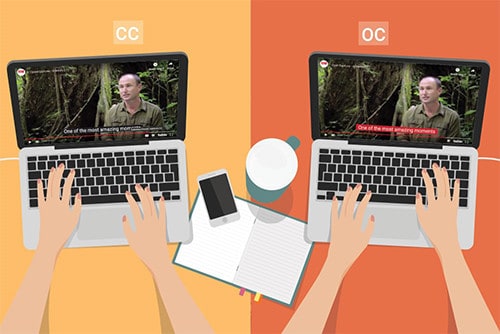
Captions in video conferencing for Conversation

Noise Removal: 

It works significantly for noise removal. Background noises can disrupt the whole idea of a meeting leading to ineffective communication. But with WebEx noise is removed leading to the effective conversation and language Interpretation. 

A live attendant: 

WebEx contains a live attendant to welcome and greet when logging in to the software. This is a heart-warming feature. It authorizes the participant and verifies it.  

Automated Captions: 

The host has the authority to on and off the interpretation and captions. It also allows you to verify your interpreter which is another interesting feature of WebEx Language Interpretation. When the interpretation and caption are not needed it is convenient to switch it off. 

See the Language Interpreter: 

WebEx is customized in such a way that many of the features are up to the choice of the users. The window for the interpreter can entirely be minimized and maximized and set the original audio in the background. It also offers a timer on the screen to get check the time allotted to every participant.  

Invite Participants: 

Invitation to listen to the interpreter is another amazing feature of WebEx. A user can invite another one to listen to the desired interpretation without breaking the flow of the actual conversation happening. It maintains the rhythm thus it does not offer any disturbance to other participants. 

Sign Language and Layout: 

These options make it more accessible as the sign language features increase its reach to the broader audience with the comfortable layout which is customizable. Layout adjustments are different with every individual so it’s exciting to set the frame according to your need. 

Conclusion: 

WebEx has numerous competitors in the markets. Language Interpretation has gained immense popularity and a lot of work and improvements are done in this feature. But the security of WebEx is exceptional during meetings and conferences. As the Zoom Application got immense attacks from hackers during the pandemic but WebEx has strong security encryption that makes it the safest among all. Its customization features attract the user to keep everything from layout to naming the folder up to their demand. It has a higher reach due to its sign language interpretation feature. For more unique content check out Languagers. 

Monday, August 2, 2021

HOW MICROSOFT TEAM SIMULTANEOUS INTERPRETATION WORKS?

 Microsoft Team and Zoom for Simultaneous Interpretation

Microsoft Team is a video calling and conference company. It is a technology-driven initiative and believes in innovation, diversity and inclusion, and corporate social responsibility. It’s on worldwide locations and contains a large global network. Microsoft is a guardian to your photos, videos, chat history, and meeting notes. It has provided convenience to chat, meet, call and collaborate. The products it offers are online meetings, video conferencing, screen sharing, custom backgrounds, and virtual events. Microsoft Team Simultaneous Interpretation is making a huge impact on people’s business meetings. Let’s explore how simultaneous interpretation works? 

No interpretation feature

Microsoft Teams offer no interpretation feature like other video conferencing applications. But it offers interpretation in a separate app and browser. It requires two meetings’ windows one in the original language and the other in the language required. Running a multilingual conference is not an easy task. Training is needed for interpreters, conference organizers, broadcasters, AV professionals. Microsoft Team also offers a paid version that consists of E1, E3, E5, or enterprise. It provides simultaneous language Interpretation through Integrated apps. These apps can be opened in another browser while using pc. Also, they could be downloaded too. 

Zoom, Kudoway, and Interprefy commonly used integrated apps:  

Microsoft Teams offers integration with the applications that count on Zoom, Kudoway, and Interprefy. These applications need to be downloaded or opened in another browser to listen to the Interpretation.  They are commonly used and widely popular regarding Simultaneous Interpretation. Microsoft Teams do not exhibit a feature of Simultaneous Interpretation. 

How does Microsoft Teams Integration work? 

Microsoft Team is an umbrella term that contains project management, file sharing, and business intelligence, to work on one board with the compilation of the huge data under one roof call Microsoft Teams. It contains several apps to make the user work on different aspects while staying connected to the Teams. Its language Interpretation works simultaneously with the apps like zoom, Kudoway, and Interprefy. They have a separate interface to enable simultaneous language Interpretation. In addition, Languagers have interesting content on Zoom Simultaneous Language Interpretation. 

language Interpretation for video conferencing

Interesting Facts about Microsoft Teams 

Microsoft Teams have exciting facts beyond its language Interpretation and integration with applications. It’s a chat app and the chat function it holds offer private and group chatting with many features. One of the interesting chat features is its formatting and emoticons. Its fast connection with the person to whom the user wants to talk is error-free and swift. It immediately connects you to the other person with just one click away. Many users have a claim and praised the security feature of Microsoft Teams. Its two-factor data authentication and data encryption offer reliable safety to the user. It also syncs the calendar for meeting schedules and more. 

Simultaneous Interpretation with Zoom and its features:  

Zoom Language Interpretation deals in nine major languages. It has an audio channel for the interpreter. Interpreters get to assign their roles in the meetings and interpret the target language to the listener. Zoom Simultaneous Interpretation feature offers all the roles in the hands of the host. Even a co-host cannot make changes and assign the role in a conversation happening. It also offers a free version to use. It is the most popular integrated app and uses widely for Simultaneous Interpretation. It also has strong competitors like Google Meet and Webex but Zoom is used by millions. 

Conclusion: 

Microsoft Teams is a mother term that offers chat and video conferences but for simultaneous Interpretation, integrated apps work to enable this feature. It’s do not exhibit an inbuilt feature in Microsoft Teams. However, the interface is convenient to use and the applications are light in size to download and listen to the interpretation. They can also be opened in another browser and used. 

Wednesday, July 14, 2021

DRAWBACKS TO CHALLENGES IN ZOOM LANGUAGE INTERPRETATION FEATURE

 Best interpreter services in business meetings

Zoom Video Conferencing App launched in 2011. It is recognized as the best language interpreter and video conferencing app globally. However, with the roses, there stack thorns too. With its immense popularity let us discuss some drawbacks to challenge in Zoom Language Interpretation Feature. No doubt it has gained the trust of millions but there is always a chance of improvement. Let us dig into it.  

Zoom app served millions of people in this Pandemic. There is seen a huge difference in the ratings and downloads figure for Zoom App. The figures are changing in plus. However, on the other hand, the reality check is that Zoom has been discovered by the masses in this pandemic.   

There are some people who are not technology-oriented and worked their whole life physically. It was a new world for them. Subsequently, Zoom took advantage of this and has introduced its simultaneous language Interpretation feature when the pandemic prolonged and users start relying on digital apps to work. 

Meanwhile, the business owners running their matters through digital apps started using and reviewing the pros and cons in the Zoom Language Interpretation feature. 

1. Interpreters get clogged: 

Interpreters are functional in pairs. During a conference or a meeting, they need to speak and translate multiple languages. The loop to work for an interpreter is it listens to English and Japanese for instance and is expected to translate it to French or Dutch. Hence it requires the ability and freedom to procure, to listen to multiple audio channels, and provide interpretation to them. However, the Zoom app features restrain an interpreter from doing so. 

As a result, they are unable to hear the partner interpreter. Most importantly, the benefit to hear the other interpreter in a conference is the exchange of feedback and approval of smooth working by the fellow interpreter.  Therefore, it leads them amidst confusion and uncertainty. 

2. Disruption in working of two interpreters simultaneously: 

Multiple interpreters in the same conference face problems during a session as mentioned earlier because they are unable to listen to the other one. To enable to do so the users have discovered an alternative that is to log in to a second session of the same conferences as a participant and listens to the other interpreter. 

It requires extra effort to resolve the issue. However, there is room for improvement for the app to make the co-existence and functionality of two interpreters convenient at a time. 

3. Particulars efforts needed to went smooth: 

There are some extra things to keep in mind while using the Zoom Language Interpretation feature. It does not offer you the cake on the plate. You have to put icing and decorate it then you will be able to eat. 

Jokes apart actions that needed to go smooth in conferences are to enable a language Interpretation feature for the interpreter to add them as their assigned role otherwise they will enter as a panelist in the session.  While using Zoom through the browser it sometimes becomes invisible. 

For this invisibility, a panelist cannot comprehend the availability of an already present interpreter and simultaneous speaking of the speakers occurs. Consequently, disorientation accompanies effective conversation.  

4. Hub of limited languages Interpretation: 

Simultaneous language Interpretation in video conferencing

With various drawbacks to be observed a jewel in the crown is the support of limited languages.  It serves only nine languages. This limitation restricts participation on a large scale. Moreover, it does not allow to use of Language Interpretation for personal meet ups. It offers this service only for business meetings and webinars. 

5. Interpretation Fail in Recordings: 

As we are heading towards the drawbacks of the Zoom Language interpretation feature the last one in the list is interpretation fails to survive while recording the session. The original audio will save into the recording but the user will miss the interpretation. Therefore, a loss will be faced while remembering things after the session.  

Conclusion:  

In concluding the whole debate Zoom has numerous features to work on and launch again a well-equipped tool that will serve a large audience. Currently, the app is in the battle with many other Interpreting services but it might lose it with time as the others are in constant improvement. Among all others, languagers is not lagging. 

Monday, May 10, 2021

HOW ZOOM IS CHANGING AMERICAN SIGN LANGUAGE?

It’s 2021, and undoubtedly no one is now a stranger to video chats. But ever heard about American Sign Language (ASL) before? Since 1927, this ASL interpretation is right there from the very beginning but with the 2020-COVID-pandemic restraining individuals to be isolated – the platforms for instance Skype, Webex, Zoom and several others got the much-needed hype. This is a result of altered aspects of American Sign Language as people are willing to rely completely on such video conferencing platforms.  

ZOOM IS CHANGING AMERICAN SIGN LANGUAGE

Zoom – Support for Deaf or Hard of hearing People 

When we talk about Zoom, the consecutive meetings and online sessions attended by thousands of individuals highlighted the need for this platform. On the other hand, the limited size of the window during Zoom’s video meetings indicates the issues that may arise for people with hard of hearing or deaf individuals. Though, zoom screen enables people to show the hand-moves but displaying of sign languages isn’t that effortless.  

This is so because several signs cannot be properly made in the dimensions of the Zoom screen. For instance, sign language interpreters demonstrate and make signs of “body” by making “B” with hands and must move it till the hips from the shoulders. But with Zoom, due to lesser space – interpreters are unable to deliver the expected signs. So, how Zoom influences the overall sign language system? Zoom’s other feature is the pre-recorded video that favours individuals to focus and learn more. And this, in turn accommodates interpreters to experience virtual classes. 

Knowing the fact that American Sign Language’s grammar is related to the facial expressions, we should know that several faces are there during a Zoom video conferencing session. As compared to class, the students are more attentive during Zoom but the teacher or interpreter needs to repeat things as students might not see signs visibly. For sign language classes, teachers make use of cards or other physical tools, which aren’t possible in Zoom. Although Zoom can help to have card games but the virtual aspects aren’t the same anymore and rather than passing out the cards – emailing them isn’t that simple. 

Sign Language and Means of Communication 

With Zoom, sign language interpreters not only go slower but also try to make things or signs with a single hand. By repeating the sign on a tiny conference screen and making smooth angles with their bodies, they bridge the gaps of communication. Moreover, people need to make sure that each sees the hands of the other individual. It is significant to understand the sign languages and the thing which should be kept in mind while adapting to Zoom. When the signs are away from a person’s body but in the forward motion, they often demonstrate the future tense while the opposite is the case with past tenses.  

The sign languages are not easy to detect on a Zoom’s video conference. In such a case, interpreters or teachers must write the content down or make the sign with the body and hands by keep on moving. Besides, sign language often requires more space for instance pointing or indicating at someone hence this might not go smooth for video conferencing platforms like Zoom. These things might return when individuals do one-on-one interactions as sign languages require specific physical movements and have strong identities.  

Final Verdict  

Though Zoom empowers deaf individuals as it offers both text and video chat, but the uninterrupted Zoom’s use may constrain and shape the sign languages like never before. Moreover, the environment, individuals we communicate with or other tools may be a contributing factor in such communicative and language practices. At Languagers, we understand the significance of virtual learning platforms like Zoom and offer our services for your growth and convenience.  

To know more about American Sign Language, feel free to contact us and have a discussion!  

Monday, April 5, 2021

Video remote interpretation services vs. phone interpreter services


Video-remote-interpretation-services-through-Cisco-Webex

Remote interpretation services allow you to communicate with someone else remotely who speaks a different language. It does not require you to see them in person because the interpreter will work remotely. 


There are two ways for remote interpretation serviceto be delivered. They can be given through a video conferencing call on the computer or a traditional telephone conversation. You get to decide whether video remote interpretation services or phone interpretation services are right for you. 


Let’s go over the main differences between each one. 


Video remote interpretation services are the newest innovation in interpretation service technology. It allows both parties of a conversation to see the interpreter on a live video feed to their computers. You can choose whichever video conferencing software you’d like to use, such as Zoom, Microsoft Teams, and Cisco Webex. We have interpreters in our network who have access to all of these video conferencing programs. 


Some people will benefit from seeing the interpreter as they speak because they can read their lips and listen to them simultaneously. And if you require an American Sign Language interpreter, then a video remote interpretation service is necessary for witnessing hand signals.  


Don’t worry about additional costs for the software because these programs are free to download and use. You don’t need any fancy computer technology either. The video software can be installed and operated on any modern smartphone or tablet that came out within the last four years. Then just use a Wi-Fi connection to link to the video conversation.   


Phone interpretation services may or may not involve a computer. If you want to use Skype to make a direct phone call without any video, you have that option. The interpreter on the other end does not need to use a computer, though. They can use any telephone to provide the interpretation service because it only involves using their voice.  


Phone interpretations work similarly to video remote interpretations. The difference is that you don’t get to see the interpreter on the call. You’ll only hear their voice give an interpretation after a person speaks. It requires a little more focus and patience, but it can still be just as effective for allowing two people of opposite languages to communicate.  


When you need to communicate with someone who does not own a computer or has no computer access, then a phone interpreter is the best choice. Most people have access to a telephone of some kind, so you shouldn’t have a problem arranging a phone interpretation conversation with them. 


phone-interpreter-services-through-telephone


The Similarities of Each Service 


There are no good or bad choices here. The choice between a video remote interpretation service or a phone interpretation service depends on your particular situation. If any of the parties have limited access to a computer or high-speed internet connection, use a telephone. Otherwise, a video remote interpretation is a great choice.  


You’ll still receive a high-quality interpretation service with either one. Our network gives you access to interpreters of more than 350 different languages. Languagers.com has interpreters established throughout the world who are waiting to help clients with their interpretation needs. Access to our network is available 24 hours per day, seven days per week. Whenever you need a video or phone interpretation service, it will always be available to you.  


We also have interpreters who specialize in the terminologies of specific industries, such as government, business, legal, education, medical, and healthcare. For instance, if you need to arrange a video or phone interpretation service with an interpreter who understands medical terminology in Chinese and English, we can connect you with an interpreter possessing these skills.   

ASL VIDEO INTERPRETATION SERVICES: HOW DO THEY HELP PATIENTS WITH HEARING DISABILITIES?

Although American Sign Language (ASL) interpreters play a crucial role for the people and especially for the whole deaf community but the ad...